# Koneksi PostgreSQL ke GUI DBeaver di Windows
Cara menghubungkan postgre ke aplikasi interface database (contoh: DBeaver)
DBeaver adalah alat basis data multi-platform gratis untuk pengembang, administrator basis data, analis, dan semua orang yang perlu bekerja dengan basis data. Mendukung semua database populer: MySQL, PostgreSQL, SQLite, Oracle, DB2, SQL Server, Sybase, MS Access, Teradata, Firebird, Apache Hive, Phoenix, Presto, dll. *(Sumber:* [*https://dbeaver.io/*](https://dbeaver.io/)*)*
Disini saya menggunakan docker image sebagai penampung environment postgres. Langkah pertama;
**1. Install Docker**
**2. Install WSL (Windows Subsystem for Linux)**
Buka WSL lalu pastekan kode berikut
```
docker pull postgres:latest
```
kemudian kode berikut untuk membuat container
```
docker run -d -e POSTGRES_USER={user} -e POSTGRES_PASSWORD={password} --name postgres -p 5432:5432 --restart=always postgres
```
**3. Install DBeaver**
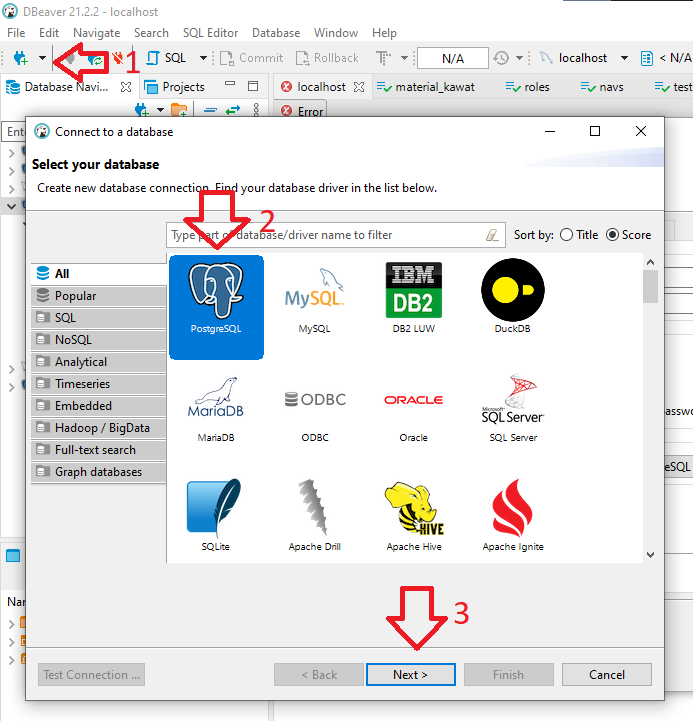
**4. Configuration DBeaver**
Ikuti petunjuk berikut
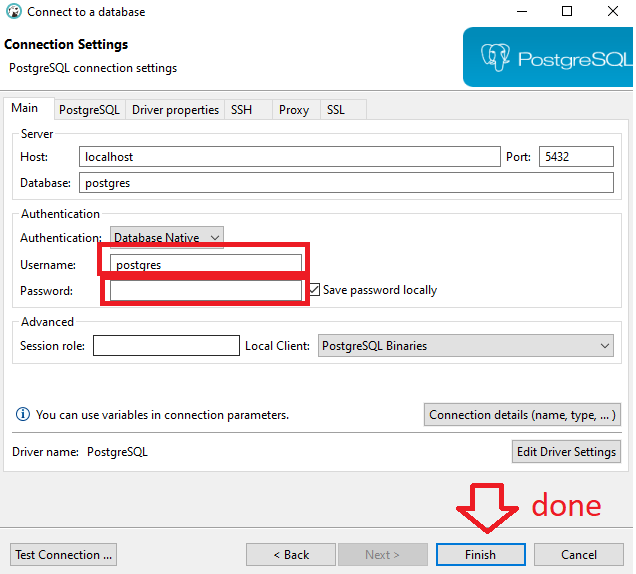
Kemudian sesuaikan koneksi settingan dengan container yang tadi sudah kamu buat
Selesai..
Baca juga: [*Tidak bisa terhubung dengan database postgre*](https://rysxa.gitbook.io/s/coding/codeigniter/tidak-bisa-terhubung-dengan-database-postgre)
Gomawo^