# Connection MySQL with Docker and WSL on Windows
Docker itu apa ?
Docker ini bisa dibilang pengganti XAMPP, hanya saja di XAMPP kita ga perlu setting-setting lagi udah bersih tinggal pakai, nah kalau di Docker ini kita bisa tambahakan container pada satu sistem, misal kita bisa pakai mysql, postgresql, dll
Caranya seperti ini:
1\. Install WSL (pengguna Windows)
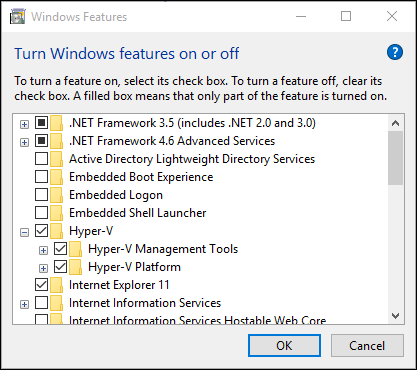
Cari **Turn Windows Features on or off**\
Select **Hyper-V** and **click OK**
2\. Install Docker
aktifkan go to Bios => configuration => **Virtualization technology** => enable it.
3\. Buka WSL lalu copycat code berikut
docker run -d --name mysqldb -p 3306:3306 -e MYSQL_ROOT_PASSWORD=root mysql:latest
#### Jika ada error seperti ini:
Jalankan command ini
```
sudo mkdir -p /etc/docker
```
```
sudo nano /etc/docker/daemon.json
```
Copy paste code berikut, lalu save
```
{
"dns": ["8.8.8.8", "8.8.4.4"]
}
```
```
sudo systemctl restart docker
```
4\. Install DBeaver
Disini untuk Interface database kalian bebas menggunakan apa, hanya disini saya kasih contoh dengan DBeaver
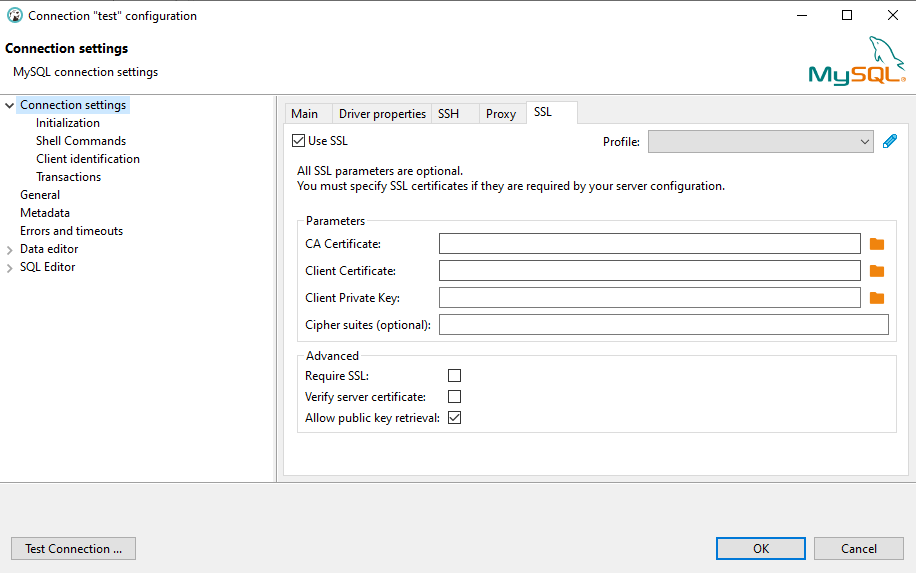
* Buat koneksi baru dengan MySQL
* Connection settings -> SSL
* uncheck "Verify server certificate"
* check "Allow public key retrival"
Selesai
Baca juga: [*Koneksi PostgreSQL ke GUI DBeaver di Windows*](https://rysxa.gitbook.io/s/coding/docker/koneksi-postgresql-ke-gui-dbeaver-di-windows)
Gomawo^